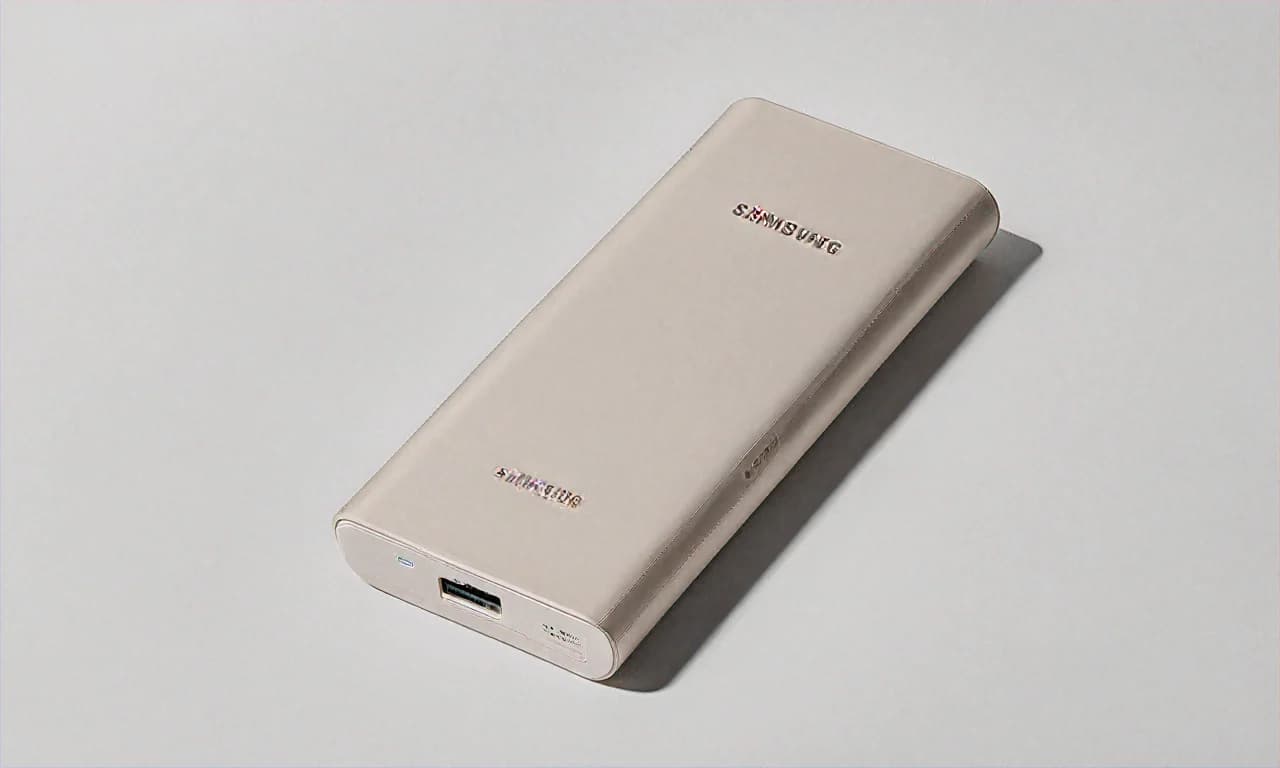
Samsung 25W Battery Pack 20000mAh — The Galaxy User's Power Bank, But Is It Worth the Extra Money?
I'll be upfront about something. I am a Samsung phone user. Have been since the Galaxy S3 days, back when Samsung phones still had removable batteries and you could carry a spare in your pocket like a responsible adult. Those days are gone, and now we all need power banks. So when Samsung released their own 25W Battery Pack, I felt almost obligated to check it out. Like, if I'm already spending ₹70,000+ on a Galaxy S24 Ultra, what's another ₹2,799 for a matching power bank, right? That's the logic, anyway.
This thing is currently available at ₹2,799 on Flipkart after a 30% discount from the ₹3,999 MRP. And yeah, that's noticeably more expensive than the Xiaomi and Ambrane options in the same 20000mAh category. The question is whether Samsung's brand name and build quality justify the premium. I've been using this for about three months now, so let me share what I actually think instead of just listing specs.
How I Got the Best Price — and How You Can Too
I bought this during the Flipkart Big Billion Days last year. The listed price was ₹2,799 but I had the Flipkart Axis Bank credit card which gave me an additional 10% instant discount. So my effective price came down to about ₹2,520. Not bad. I've also heard from friends who used HDFC cards during different Flipkart sales and got similar discounts. The point is — don't buy this at full price. Wait for a sale. Flipkart has sales practically every month at this point. Big Saving Days, Big Billion Days, Republic Day, Independence Day... there's always something coming up.
Some people ask me why I didn't just buy it from Croma or Reliance Digital instead. Fair question. I checked both stores at Phoenix Marketcity in Bangalore and they were selling it at MRP — ₹3,999 — with no discounts. The Croma guy tried to sell me some third-party brand saying "sir, same thing hai" but no. If I'm buying Samsung, I'm buying Samsung. Offline retail in India still hasn't figured out competitive pricing for accessories, apparently.
Unboxing and First Impressions
Samsung does packaging well. You get a clean white box with the power bank, a short USB-C to USB-C cable, and a warranty card. That's it — no charger included, which is becoming annoyingly standard across the industry. But at least they included a cable, unlike Xiaomi who gives you literally nothing. The cable quality is decent, not great. I'd recommend using your own Samsung cable or buying a good Anker or Portronics cable separately.
When you first hold the Samsung 25W Battery Pack, you immediately notice the difference from budget options. The metallic finish has a weight to it — about 420g — that feels solid without feeling like a brick. The rounded corners and smooth edges make it comfortable to hold. I got the Grey variant and it looks really professional. You could put this on a conference table at a meeting and nobody would think twice about it. Try doing that with a bright yellow Realme power bank — different vibes entirely.
They also make it in Pink, which my wife promptly claimed when she saw it on Flipkart. I ended up ordering a second one for her. She uses it with her Galaxy A54 and has been happy with it. The Pink shade is actually quite classy — not that flashy bubblegum pink but a more muted, rose-gold-ish tone.
Build Quality — This Is Where Samsung Stands Apart
I've dropped this power bank twice. Once on a tiled floor at Bangalore Airport (Terminal 2, near the charging area — you know, the one that never has enough power sockets) and once from my desk at home onto a wooden floor. Both times, not even a scratch. The metallic body absorbs impacts really well and there's no rattling sound from internal components. I can't say the same about plastic power banks. My old Ambrane power bank developed a visible crack after a similar drop.
The finish resists fingerprints reasonably well on the Grey model. Not perfectly — if you have oily hands after eating samosas at the airport lounge, you'll see smudges — but a quick wipe with your shirt cleans it right up. The LED indicator strip on the front is a single bar that fills up to show charge level. It's minimalist. Some people prefer the exact percentage display you get on boAt or URBN power banks, but I actually like the simplicity. Press the button, see roughly how much charge you have, move on.
The USB-C port is recessed slightly into the body, which is a smart design choice. It means the cable connection is protected and less likely to get damaged if the power bank is tossed around in a bag. The port feels firm — no wobbling when you plug in a cable. After three months of daily use, the port still feels as tight as day one. Build quality? Samsung nailed it. No question.
Charging Performance — The Good, The Okay, and The Slightly Disappointing
Here's where I need to be nuanced. The 25W output is great... for Samsung phones. My Galaxy S24 Ultra charges from this power bank at proper Super Fast Charging speeds. I went from 15% to 60% in about 35 minutes during a recent trip. That's almost as fast as using the wall charger. The handshake between the Samsung power bank and Samsung phone is instant — you plug in and within 2 seconds, the phone shows "Super Fast Charging" on the lock screen. No hesitation, no falling back to slow charging like sometimes happens with third-party power banks.
Now, here's what I mean by "slightly disappointing." 25W in 2025 is... just okay. Xiaomi is offering 33W at ₹1,799. Even Ambrane gives you 27W at ₹1,299. Samsung is charging a significant premium but giving you lower wattage than competitors. Yes, the Super Fast Charging optimization for Galaxy phones matters and you do get reliable, consistent 25W to Samsung devices. But if you're charging a non-Samsung phone — say, a Pixel 8 or iPhone 15 — you're limited to whatever USB PD negotiates, usually around 18-20W. Not bad, but also not what you'd expect at this price point.
The port situation is another thing. You only get two ports total — one USB-C (input/output) and one USB-A. Compare that to Xiaomi's three ports or Ambrane's three ports. If you're someone who needs to charge your phone, your friend's phone, and your earbuds simultaneously at a chai stall during a road trip... you're going to need to pick two. Not three. This bothered me on a recent group trip to Coorg where four of us were sharing two power banks and port real estate was at a premium.
On the positive side, the Samsung power bank charges both devices at the same time without dramatic speed drops. The power distribution seems well-managed — USB-C gets priority (around 20W) and USB-A gets about 10W. It's predictable and consistent, which I appreciate more than raw numbers sometimes.
AFC and USB PD — Protocol Support Matters More Than You Think
One thing I want to explain because I see a lot of confusion about this online. Samsung uses two fast charging protocols — AFC (Adaptive Fast Charging, which is their older standard) and USB PD (Power Delivery, which is the universal one). This power bank supports both. What this means in practice:
- Samsung Galaxy S21 and older: Uses AFC for fast charging. This power bank supports it. You'll get proper fast charging.
- Samsung Galaxy S22 and newer: Uses USB PD 3.0 for Super Fast Charging. Fully supported here at 25W.
- iPhone 15 and newer (USB-C): Uses USB PD. You'll get around 20W, which is close to maximum for iPhones.
- Older iPhones with Lightning: Via the USB-A port, you'll get Apple's standard 5W-ish charging. Slow, but that's a Lightning limitation.
- Redmi, Realme, OnePlus: You'll get standard USB PD/QC speeds, not their proprietary fast charging. Usually 15-18W.
The protocol support is solid but not exceptional. No QC 4.0, no PPS (which Samsung's own phones support for 45W charging), no VOOC or Dart Charge. If you own a Samsung Galaxy phone, this is perfectly optimized for you. If you don't... you might get better value from a Xiaomi or URBN power bank that supports more protocols at a lower price.
How Long Does It Last in Real Usage?
The 20000mAh capacity delivers roughly 3-3.5 charges for a Galaxy S24 (which has a 4000mAh battery) or about 2.5 charges for a Galaxy S24 Ultra (5000mAh battery). With my Ultra, I typically get through a full weekend trip — Friday evening to Sunday evening — on a single charge of the power bank, topping up my phone once or twice each day.
For reference, during a recent wedding in Jaipur (three days of functions, constant photo-taking, WhatsApp video calls with relatives who couldn't make it), this power bank kept my phone alive through the whole affair. I charged it fully before leaving Bangalore, and it lasted the entire trip with careful usage. By "careful" I mean I wasn't charging my phone to 100% every time — just topping up to 70-80% when it dropped to 20%. That kind of disciplined usage extends the power bank's practical life significantly on trips.
Self-Charging and the Charger Situation
The power bank accepts 25W input via USB-C. With a 25W Samsung adapter (the one that used to come in Galaxy S boxes before Samsung decided to "save the environment"), it takes about 3 hours to fully charge from empty. That's middle-of-the-road. Nothing spectacular, nothing terrible.
If you use a lower wattage charger — like a random 10W adapter from an old phone — expect 6-7 hours. I made this mistake once during a power cut in my Bangalore flat. The inverter was only powering a few sockets and I plugged the power bank into whatever charger was handy. Woke up after 8 hours and it was at 90%. Lesson learned — use a proper 25W charger.
One thing I actually appreciate is that Samsung doesn't do anything weird with proprietary charging for the power bank itself. Any standard USB-C PD charger works. I've used my MacBook charger (30W) and it worked fine, charging at 25W as expected. No need to buy a Samsung-specific adapter.
Warranty and After-Sales — Samsung's Biggest Advantage
This is honestly one of the main reasons I chose Samsung over competitors. You get a full 1-year warranty from Samsung India, and Samsung has service centres in practically every city in the country. I've seen Samsung service centres in places like Hubli, Rourkela, and Dehradun — not just metro cities. If something goes wrong, you have a proper warranty backed by a company that isn't going anywhere.
Compare this to brands like Ambrane (6 months warranty), Xiaomi (6 months for power banks), or even some online-only brands where the "warranty" means shipping the product to some warehouse in Shenzhen and waiting 6 weeks for a response. Samsung's warranty gives genuine peace of mind, and for some people, that alone justifies the higher price.
I haven't needed warranty service myself, but a colleague at work had an issue with his Samsung power bank (different model) and got it replaced at the Samsung service centre in Koramangala, Bangalore within 4 days. That kind of quick turnaround matters.
Who Is This For — and Who Should Skip It?
Buy this if you own a Samsung Galaxy phone and want a power bank that works perfectly with it, with no compatibility concerns. Buy it if you value build quality and don't mind paying a bit more for it. Buy it if a 1-year Samsung warranty matters to you. Buy it if you want something that looks professional and understated rather than flashy.
Skip this if you need 33W or higher charging speeds. Skip it if you need three or more ports. Skip it if you're on a tight budget — the Xiaomi at ₹1,799 or Ambrane at ₹1,299 give you more raw value per rupee. And honestly, skip it if you use a Realme or OnePlus phone — the Realme 30W Dart Charge power bank will serve you better with proprietary fast charging support.
The Samsung 25W Battery Pack at ₹2,799 is not the cheapest power bank. It's not the fastest. It doesn't have the most ports. But it does what it does reliably, it looks good doing it, and it's backed by one of the best after-sales networks in India. Sometimes that's exactly what you need. Wait for a Flipkart sale, stack it with your Axis Bank or HDFC card offer, and you'll get a solid deal on a power bank that'll last you years.


