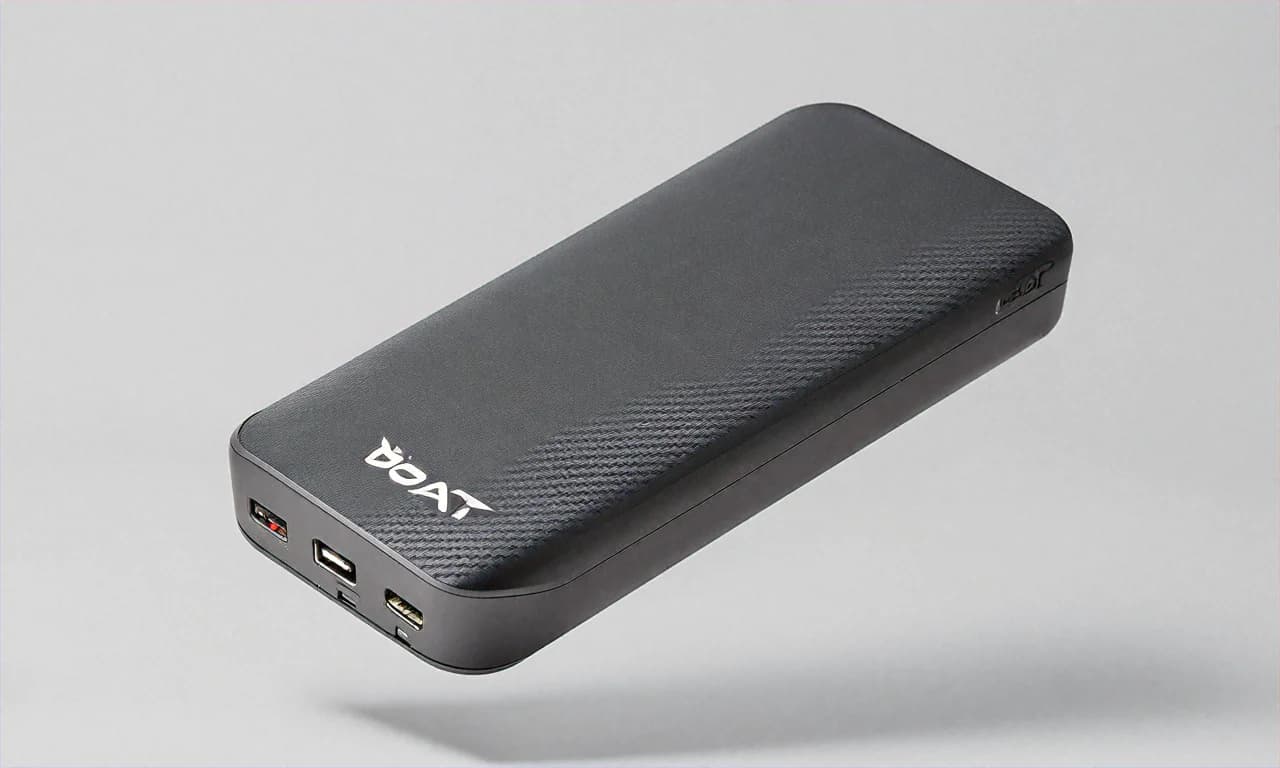
URBN 65W 20000mAh GaN Power Bank — The Mid-Range Laptop Charger That Nobody Talks About But Everyone Should
I need to start this review with a confession. Until about eight months ago, I'd never heard of URBN. Like, at all. I was browsing Amazon India during the Great Indian Festival sale last year, looking for a power bank that could charge my HP Pavilion laptop on the go, and this thing kept showing up in the search results between the Baseus Blade and some no-name Chinese brands. My first reaction was skepticism — another new brand trying to sell overpriced accessories with flashy marketing? We have seen that movie before in India. Multiple times.
But the specs caught my eye. 65W USB-C PD output. GaN technology. 20000mAh capacity. ₹3,499 after 30% discount from the ₹4,999 MRP. And the reviews were overwhelmingly positive — not the suspicious "5 stars amazing product best in India" kind of reviews that smell like paid placements, but actual detailed reviews from people who seemed to have legitimately used the product. So I took a chance. And now, eight months later, I'm writing this review because I think this power bank deserves way more attention than it's getting.
First Things First — What Even Is GaN and Why Should You Care?
GaN stands for Gallium Nitride. I know that sounds like something from a chemistry textbook that you slept through in 12th standard (no judgement, I did too). But here's the simple version. Traditional power electronics use silicon transistors. GaN transistors are smaller, more efficient, and generate less heat while handling the same amount of power. This means a GaN-based power bank can deliver 65W of output while being physically smaller and lighter than a silicon-based power bank delivering the same wattage.
In practical terms for you and me? The URBN 65W is roughly the size of a standard 20W power bank. Pick up any ₹1,500 Mi or Ambrane 20000mAh power bank and hold it next to the URBN 65W. You will struggle to tell the difference in size. But one of them can charge your laptop and the other can't. That size advantage comes entirely from the GaN chipset inside.
GaN also runs cooler during operation. I've used this power bank to charge my laptop for hours and the surface temperature stays warm but never hot. Compare that to some older 65W power banks I have tried (including one from a brand I won't name that I picked up in Nehru Place) that got uncomfortably hot after 30 minutes of laptop charging. Heat is the enemy of battery longevity, so cooler operation means the power bank's internal cells should last longer over years of use.
Build Quality — Surprisingly Good for a Brand This New
The first thing I noticed when I unboxed this was the weight. Or rather, the lack of it. At 440g, this feels lighter than it should for a 65W 20000mAh unit. The Baseus Blade is 480g and that's considered light for its class. The URBN manages to shave off another 40g which makes a noticeable difference when you're carrying it in a laptop bag all day. I commute by metro in Delhi and every gram matters when you're standing in a packed Blue Line train during rush hour holding your bag up because there's no space to put it down.
The matte black finish with soft-touch coating feels good in hand. No flex, no creaking when you press the sides, no rattling sounds when you shake it. The rounded edges make it comfortable to grip and it doesn't dig into your palm like some power banks with sharp corners. My one aesthetic complaint is that the URBN branding on the front is a bit too large and prominent for my taste. But that's purely cosmetic and has zero impact on functionality.
The LED digital display is a welcome addition. It shows battery percentage as a number (not those vague four-dot indicators that tell you nothing useful) and also displays real-time output wattage. So when you plug in your laptop, you can actually see "63W" or "58W" on the display and know exactly what's happening. When I first plugged in my MacBook Air M2, seeing "63W" flash on the tiny screen gave me immediate confidence that this thing was actually working at full speed. No guessing games.
Charging My Laptop — The Whole Reason I Bought This Thing
Let me get into the details because this is what matters most. I primarily bought this to charge my HP Pavilion x360 (the one with the 11th gen Intel i5) and occasionally my friend's MacBook Air M2 when we're working from coffee shops. Here's what I found.
MacBook Air M2
The URBN 65W charges the MacBook Air M2 at essentially full speed. The MacBook Air M2 draws about 60-63W when charging from empty, and this power bank delivers that without breaking a sweat. From a dead laptop to 50% takes about 40-45 minutes, which is nearly identical to charging from a wall outlet. One full charge of the power bank gives you roughly 70-80% on the MacBook Air from zero, which translates to about 6-7 hours of additional work time if you're doing light tasks like browsing, writing documents, and watching videos.
HP Pavilion and Windows Ultrabooks
My HP Pavilion draws about 45W when charging, so the 65W output is more than enough. Lenovo Yoga series, Dell XPS 13, HP Spectre — all these ultrabooks that charge via USB-C at 45-65W work perfectly with this power bank. The URBN handles them without any power negotiation issues that I've experienced with cheaper power banks. You plug in and it just starts charging at the expected speed. No fiddling with cables, no unplugging and replugging needed.
Bigger Laptops — Here Is Where You Need to Set Expectations
If you have a MacBook Pro 14-inch or 16-inch, a gaming laptop, or any workstation-class machine that wants 100W or 140W of power, this is not the right power bank for you. The 65W output will technically charge these laptops, but slowly. Your MacBook Pro 16-inch might show "Not Charging" under heavy load because it's consuming more power than the 65W the power bank can deliver. It can keep the battery from draining further, but don't expect it to actually charge the laptop while you're doing heavy work. For those use cases, you need the Baseus Blade 100W or something similar.
I tried it with my colleague's Lenovo Legion gaming laptop at office. It did charge, but at a rate of about 5-8% per hour while he was coding and running Docker containers. Not exactly useful. The power bank is really designed for ultrabooks and thin-and-light laptops, not power-hungry machines.
Phone Charging — Where It Also Shines
While laptop charging is the headline feature, I end up using this to charge my phone more often than my laptop. The two USB-C ports support USB PD 3.0 up to 65W and PPS (Programmable Power Supply) for Samsung devices. My Samsung Galaxy S23 FE pulls about 25W through PPS, which is solid. Not the full 25W that Samsung's own charger provides but close enough that I don't notice a meaningful difference in real-world charging speed.
For iPhone users, the power bank delivers up to 27W through USB PD which is the maximum that iPhones accept. So your iPhone 14, 15, or 16 will charge at full speed. A friend with an iPhone 15 Pro Max tested it at my place and went from 20% to 60% in about 25 minutes. He was impressed enough to order one for himself, though he went with the more compact URBN 10000mAh model since he doesn't need laptop charging.
The USB-A port maxes out at 18W via Quick Charge 3.0. This is the port I use for my earbuds and smartwatch. It also works for older phones that don't support USB-C charging. My father still uses a phone with Micro-USB and he charges it through the USB-A port with a USB-A to Micro-USB cable. Works fine at about 10-12W which is all his phone accepts anyway.
Self-Charging — Under 2 Hours from Dead to Full
This is where the URBN really surprised me. The power bank accepts 65W input through its USB-C port and goes from 0% to 100% in approximately 1 hour and 50 minutes. Under two hours for a 20000mAh power bank. Let me put that in perspective. My old Mi 20000mAh 33W power bank takes about 4 hours to fully charge. The Samsung 25W takes even longer. The only power bank I've seen charge faster than the URBN is the Baseus Blade at 1.5 hours, and that costs ₹2,000 more.
The fast self-charging is actually a bigger deal than most people realise. It means you can plug in the power bank during a lunch break at work — just one hour — and get it to about 60% which is enough for one full laptop emergency charge. Or charge it during a two-hour class at college and have it ready for the rest of the day. The days of having to leave your power bank charging overnight are over with this thing.
You do need a 65W or higher USB-C charger though. The power bank doesn't come with a charger in the box — just a USB-C to USB-C cable. If you already have a 65W GaN charger for your laptop, use that. If not, budget another ₹1,500-2,000 for a good 65W charger. The Anker 735, the Baseus 65W GaN, or even the Amazon Basics 65W are all good options. Think of it as a total investment — ₹3,499 for the power bank plus ₹1,500 for a charger gets you a complete laptop charging setup for ₹5,000.
Smart Power Distribution — Three Devices at Once
The URBN has two USB-C ports and one USB-A port. You can charge three devices simultaneously and the power bank intelligently distributes wattage across all connected devices. Here's what I've observed in practice.
- Single device on USB-C: Full 65W output. Perfect for laptop charging.
- Two devices on USB-C: Roughly 45W + 20W split. Enough for a laptop and a phone simultaneously, though the laptop charges slower.
- All three ports active: Approximately 35W + 18W + 12W distribution. Not ideal for laptop charging but fine if you're just topping up multiple phones and accessories.
The display helps here because you can see the total output wattage changing as you plug in and unplug devices. It takes about 2-3 seconds for the power negotiation to settle when you connect a new device. No issues with sudden disconnections or power drops that I've seen with some other multi-port power banks.
Amazon Deals, Bank Offers, and the Best Time to Buy
The ₹3,499 regular sale price is already 30% off the ₹4,999 MRP, which is a solid deal. But if you're patient and can wait for the right sale event, you can do better.
During the Amazon Great Indian Festival (usually around October, timed with Navratri and Diwali), ICICI credit card holders get an additional 10% instant discount up to ₹1,250 on electronics. That brings the effective price to around ₹3,150. HDFC credit card holders get similar offers during Amazon Prime Day in July. SBI card holders sometimes get exclusive deals during Republic Day and Independence Day sales.
Amazon Pay ICICI credit card gives you 5% cashback on all Amazon purchases, which is another ₹175 saved. If you have Amazon Prime membership — and honestly, most people who shop on Amazon regularly do — you get early access to sale deals and sometimes exclusive Prime-only prices that are ₹200-300 lower than the regular sale price.
No Cost EMI is available on this product, typically for 3 or 6 months. At ₹3,499, that's about ₹583 per month for 6 months. If cash flow is a concern, this makes the purchase a lot more manageable. I know students especially appreciate this option — a lot of engineering and MBA students I know buy their gadgets on EMI during college.
One more tip: check for Amazon coupon clips on the product page. Sometimes there's an additional ₹100-200 coupon that you can apply at checkout. These coupons stack with bank offers. I've personally saved ₹150 using a page coupon on top of my ICICI instant discount during the last sale.
URBN as a Brand — Should You Trust a Newcomer?
This is the elephant in the room and I want to address it directly. URBN is a relatively new brand in the Indian market. They don't have the decades of trust that Samsung, Xiaomi, or Anker have built up. If something goes wrong with your URBN power bank, you cannot just walk into a Samsung service centre or a Mi Store and get it fixed.
What URBN does have is a 1-year warranty with replacement via Amazon. In my experience, Amazon's replacement process for electronics is smooth — you file a return, they send a replacement, done. I've not personally needed to claim warranty on this product, but I've claimed warranty on other electronics through Amazon and the process was painless every time.
The product is also BIS certified, which means it meets the Bureau of Indian Standards safety requirements for power banks sold in India. This isn't optional — it's legally required. But some smaller brands try to skip this or use fake certification numbers. I checked URBN's BIS certification number and it's legitimate.
My take? For a ₹3,499 product with Amazon's return and replacement backing, the brand trust factor is a minor concern. If this were a ₹15,000 purchase, I'd hesitate more with an unknown brand. But at this price point, the risk is manageable and the product quality speaks for itself.
Who This Power Bank Is Perfect For
- Students with ultrabooks: If you're carrying a MacBook Air, HP Pavilion, or Lenovo Yoga to college every day and the campus charging situation is terrible (and let's be real, it usually is), this power bank means you never have to fight for a wall socket again.
- Working professionals who travel: If your job involves travelling between client offices, co-working spaces, or cities and you need your laptop alive at all times, the 65W output keeps you productive without hunting for power outlets in random offices.
- People who want one power bank for everything: 65W for laptops, 27W for iPhones, 45W PPS for Samsung, 18W QC for earbuds. One device, all your gadgets covered.
- Budget-conscious buyers who need laptop charging: The Baseus Blade 100W costs ₹5,499. The URBN 65W costs ₹3,499. If 65W is enough for your laptop (and for most ultrabooks it's), you save ₹2,000.
Who Should Skip This
- Gamers with power-hungry laptops: 65W won't cut it for gaming laptops or MacBook Pro 16-inch. Go for the Baseus Blade 100W instead.
- Budget buyers who only need phone charging: If you don't own a USB-C laptop, paying ₹3,499 for 65W output makes no sense. Get the Mi Power Bank 4i at ₹1,799 and save ₹1,700.
- Brand loyalists: If you only buy from established names like Samsung, Xiaomi, or Anker and an unfamiliar brand makes you uncomfortable, this isn't for you. And that's okay.
Eight months in, the URBN 65W GaN sits in my laptop bag every single day. My HP Pavilion's original charger stays at home on my desk permanently. When I travel for work — Bangalore, Mumbai, Pune, wherever — I pack one 65W GaN wall charger and this power bank and I'm sorted for my laptop, phone, earbuds, and watch. The total weight of this setup is less than carrying my laptop charger alone. That's the kind of practical upgrade I didn't know I needed until I'd it. At ₹3,499 on Amazon, probably ₹3,100-3,200 during a good sale with your HDFC or ICICI card, it has been one of my better tech purchases this year.